
“Session Updater has saved me countless hours by finally allowing me to swap files in iZotope RX! I rely extensively on iZotope RX for my mastering work, from getting rid of erroneous pops and clicks, to manually de-essing, de-resonating and spot EQ'ing mixes to prep them for mastering.
Up until now I had to redo all that work that is time consuming but critical for making a record sound the best it can possibly sound. Not anymore!
Session Updater has become an invaluable and irreplaceable tool of my process!”
The RX application has no feature for replacing the source audio in a saved session. When a revised mix arrives, the edits in the session are forever tied to the original audio… until now.
This tool unpacks the session, substitutes the new audio file, and
creates a new .rxdoc file with the markers and view state
intact. It can also reconstruct your original edits using the new
audio.
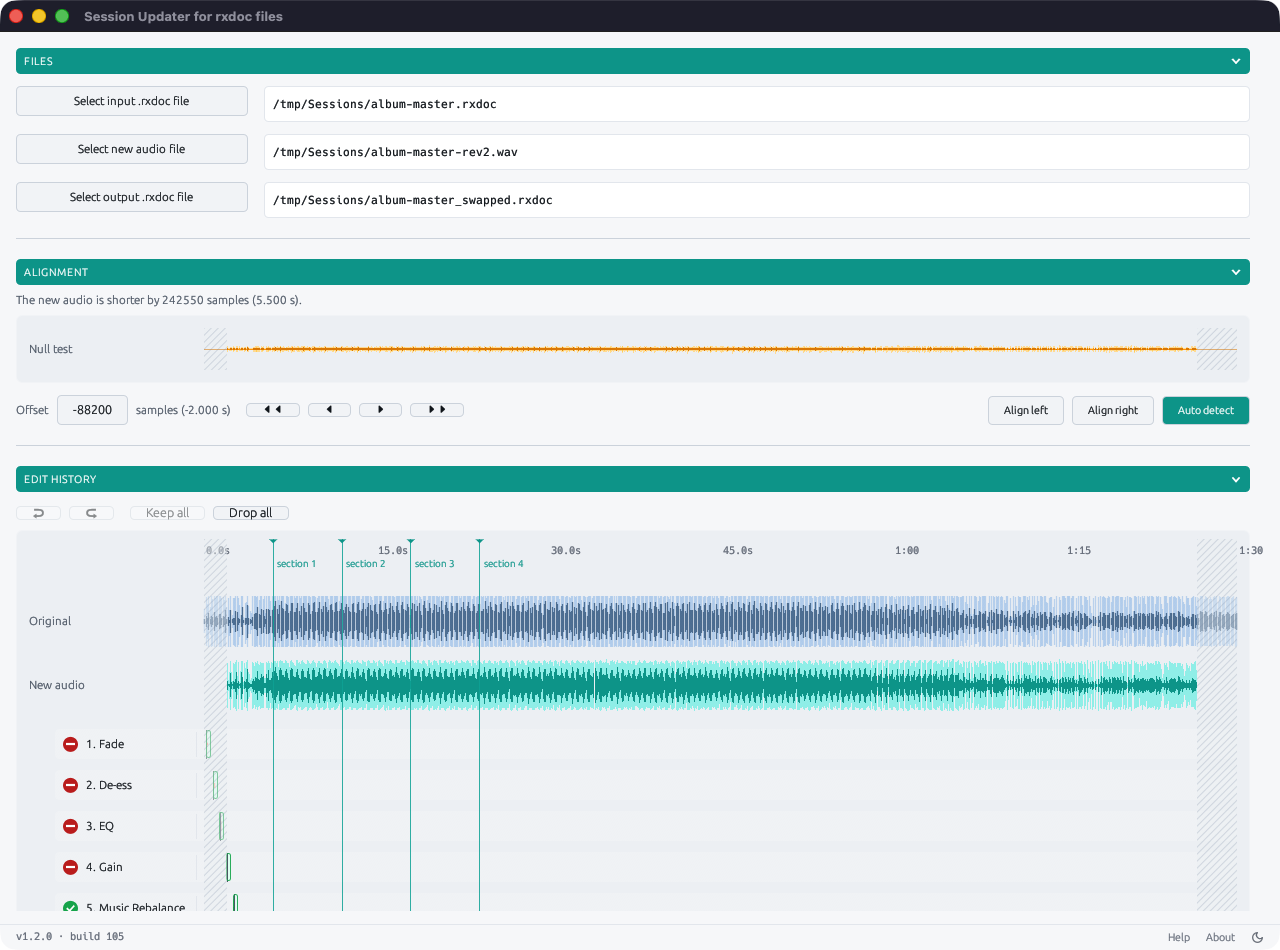
Session Updater understands the internal structure of an
.rxdoc file and is able to trace relationships between each
of the edits stored within. Using the processed and unprocessed audio it
is able to calculate a transfer function in the frequency domain for
every original edit.
These transfer functions can then be re-applied to the corresponding audio ranges in the replacement audio, effectively reconstructing the session edits, even where multiple edits affect the same audio region.
This works great for fades, gain moves, EQ and de-essing functions, and
does a pretty good job for other types of processing. Every
reconstructed edit can be auditioned and either kept or discarded when
generating the new .rxdoc file.
Sometimes a new mix arrives which is longer or shorter than the original. Session Updater includes a powerful alignment tool to help line up the old and new audio files correctly, with a graphical null test display and nudge buttons to perfect the alignment. Edits are then automatically moved back or forward in time to make sure they affect the exact same audio range as in the original project.

Session Updater generates a brand new .rxdoc file
containing all new audio but preserving the original view state and
markers. To make sure your work is always safe, Session Updater will
refuse to overwrite the original project file.
macOS: macOS 11 (Big Sur) or later, on Intel or Apple Silicon (universal binary).
Windows: Windows 10 or 11, 64-bit.
per user
Secure checkout powered by Stripe. The price is charged in pounds sterling, euros or US dollars, as chosen on the purchase page.
Yes. There is no device limit, so feel free to install and run on as many machines as you personally work on.
Email hello@sessionupdater.com and it will be re-issued.
No, Session Updater is a one-time purchase.
No, Session Updater never accesses the internet, even during activation.
No, Session Updater is completely free of all forms of AI. Reconstruction of edits is 100% deterministic and uses only mathematical transformations to analyse and process audio.
Although there are no guarantees, we will strive to maintain
compatibility and issue free updates to handle any future changes to
the .rxdoc file format.
 Session Updater